Setting up the Remote Laboratory
The remote laboratory allows users to remotely execute their programs on real hardware through the use of multiple CREATOR Gateways.
Info
Currently, only the ESP32 Gateway is supported.
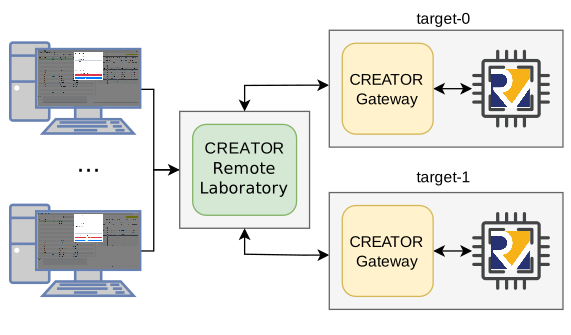
CREATOR Remote Laboratory.
Setup and configuration
The recommended way of running the remote laboratory is through the Docker image.
Tip
For alternative ways of execution, check the source repository.
First, create a file structure such as this:
On the remote lab container configuration:
results/must be mounted to/app/results/andconfig/to/app/config/- The server will listen on port
5000, so we should expose that port - In order to send the results via email, you must set your Google Mail address in the
EMAILenvironment variable and your app password in thePASSWenvironment variable.
We should also deploy the gateways. More information on CREATOR Gateway.
We can do all this with Docker Compose, in the compose.yaml file:
services:
  creator-remote-lab:
    image: creatorsim/creator-remote-lab:latest
    volumes:
      - ./config:/app/config
      - ./results:/app/results
    ports:
      - "5000:5000"
    environment:
      - EMAIL=test@inf.uc3m.es  # google mail address
      - PASSW=abcdefghijklmnop  # google app password

  target-0:
    image: creatorsim/creator-gateway-esp32:latest
    devices:
      - /dev/ttyUSB0
    stdin_open: true
    tty: true

  target-1:
    image: creatorsim/creator-gateway-esp32:latest
    devices:
      - /dev/ttyUSB1
    stdin_open: true
    tty: true
The configuration of the target boards is placed in config/deployment.json. You must provide the type of board (target_board), the USB port of the board (target_port), and the URL of the gateway server (target_url). As we're doing everything with Docker Compose, we can just use their container names and prevent exposing the ports to localhost.
E.g.:
{
  "target-0": {
    "target_board": "esp32c3",
    "target_port": "/dev/ttyUSB0",
    "target_url": "http://target-0:8080"
  },
  "target-1": {
    "target_board": "esp32c3",
    "target_port": "/dev/ttyUSB1",
    "target_url": "http://target-1:8080"
  }
}
The execution results will be stored in the results/ folder.
Then, we can deploy everything with: